Tag: Flickr

  • From Pile to Picture: My Seestar Pipeline Goes Live

    Last week I wrote about cataloguing everything my Seestar S50 has captured: 65 targets, about 77 hours of data, and a list of next steps that I described as “ideas at this stage rather than anything built”.

    That didn’t last long. Two of those ideas, proper stacking on the PC and publishing to my astronomy site, were built the same weekend and went live on 8 and 9 November. Since then two finished images have gone from a pile of 10-second frames on the NAS to published posts on vividgrey.co.uk, and the only thing I did by hand was press Publish.

    First, was it worth it?

    Before building anything, I had Claude Code do a proof of concept on the obvious candidate, the Whirlpool Galaxy (M 51), which is almost a quarter of everything I’ve captured. The question was simple: does stacking many nights together in Siril beat the Seestar’s own best single-night stack?

    • A two-night test first. Two nights in May 2025 stacked in under two minutes. The detail was about the same as the Seestar’s stack from one of those nights, but Siril’s rejection removed a satellite trail that the Seestar had kept.
    • Then everything. 6,254 sub-frames went in and 4,628 were stacked, about 12.9 hours of light. 792 frames failed to align and 834 were thrown out by a filter that rejects stars that aren’t round.
    • The comparison. Against the Seestar’s best stack (1,362 frames, about 3.8 hours), the spiral arms are better defined, the faint plume of material around its companion galaxy NGC 5195 shows up, and there are more faint stars. The Seestar’s version has a slightly darker background, to be fair to it.

    The verdict was “worth automating”, so we did.

    The PC half: AstroProcessor

    Siril would run on the Raspberry Pi, but the Pi is already busy with everything else, so the heavy lifting happens on my Windows PC. AstroProcessor is a Python script (standard library only) that Task Scheduler runs every Tuesday and Friday at 20:00. It started as Friday only; I added Tuesday the next day so that images arrive more often.

    Each run processes exactly one target:

    • It picks the target. It reads the Astronomy notes in my Obsidian vault and looks for deep-sky objects (not stars, planets, the Moon, the Sun or comets) that haven’t been processed yet and have at least an hour of frames. The one with the most integration wins. If a target was shot through more than one filter, only the filter with the most data is used.
    • It copies the frames locally. Working directly from the NAS is too slow, and copying turned out to be the real bottleneck: in the proof of concept, copying M 51’s frames took 94 minutes and Siril itself only took 11.
    • It stacks them. Siril’s command-line version runs a script based on the official Seestar preprocessing script: debayering, two-pass registration, the roundness filter and a rejection stack that throws out outliers such as satellite trails and aircraft.
    • It finishes the image. A small crop to remove the ragged edges, background extraction, plate solving (working out exactly where in the sky the image points), and then colour calibration using Siril’s SPCC, which compares star colours against the Gaia catalogue with a profile for the Seestar’s sensor. Then a stretch, and a JPEG.
    • It records everything. Alongside the JPEG it writes a JSON file with every capture and processing detail, and updates the target’s note in the vault with when it was processed, how many frames were used and how many hours they add up to.

    The online catalogue servers Siril normally uses kept timing out, so the Gaia catalogues now live on the PC (22.4 GB of them) and everything runs offline. And in one of the first tests, colour calibration quietly fell back to none at all: the way Python is installed on that PC meant Siril couldn’t see its own saved settings. Every script now sets the catalogue locations itself, and the run falls back to a simpler calibration, then to none, rather than failing outright.

    The Pi half: AstroPublisher

    Every morning at 07:30, AstroPublisher on the Raspberry Pi looks for anything the PC has left in a “ready” folder on the NAS. Unlike a lot of my automations, there’s no AI involved at this stage. It’s a plain Python job that builds everything from the JSON file and the description in the target’s vault note. For each image it:

    • Uploads it to Flickr, public, into a Seestar S50 album, with a title, description and tags.
    • Creates a draft post on vividgrey.co.uk with the image (linked to Flickr) as both the main picture and the featured image, a short description of the object, a capture details table (frames captured, aligned and stacked, total integration, nights, exposure, gain, filter, sensor temperature, image scale, calibration and the Siril version) and a list of the processing steps.
    • Updates my notes. The target’s note gets the Flickr and draft links, and the Daily note gets a line saying what was processed plus a checkbox reminding me to review and publish the draft. If I leave it, the reminder comes back every seven days.
    • Notices when I’ve published. Once the post is live, the next run marks the target’s note as published, with the date and URL.

    It also keeps an eye on the PC. If the Tuesday or Friday run produced nothing, the Wednesday or Saturday Daily note says so, and asks whether the PC was switched on. That has already happened once: this Friday’s run produced no image, and Saturday’s note told me.

    The guardrails

    This is the same pattern as the drafts on this blog, and the rules are deliberately narrow:

    • Drafts only. The WordPress client can create a post with its status hard-coded to draft, upload new media and add missing categories and tags. It can’t publish, edit or delete anything, and its self-test checks the code for any other kind of write.
    • No accidental secrets. It refuses any content containing one of my stored credentials, or anything shaped like a key or token, and it refuses duplicate titles.
    • Flickr is add-only. The uploader only uploads new photos and never changes an existing one. Every upload is recorded by a fingerprint of the file, so the same image can’t go up twice.
    • The raw data is read-only. The Pi sees the telescope’s files through a read-only mount. The only folder it can write to is the hand-off folder.

    The first run’s bug

    The very first live run is a good example of why those rules matter. AstroProcessor stacked M 51 overnight, from 22:35 on 8 November to 03:27 the next morning, and AstroPublisher was started by hand straight afterwards.

    It failed at the Flickr step. The new uploader had created its record of uploaded photos as an empty file, and then crashed trying to read that empty file. The problem was that this happened after the upload. The photo was on Flickr, public, but not recorded and not in the album, so simply running it again would have uploaded it a second time.

    The fix was small: an empty or missing record now counts as “nothing uploaded yet”, and the self-test covers that case. The photo that had already gone up was added to the record by hand so the retry reused it, and the retry a minute later went through cleanly.

    The first two images
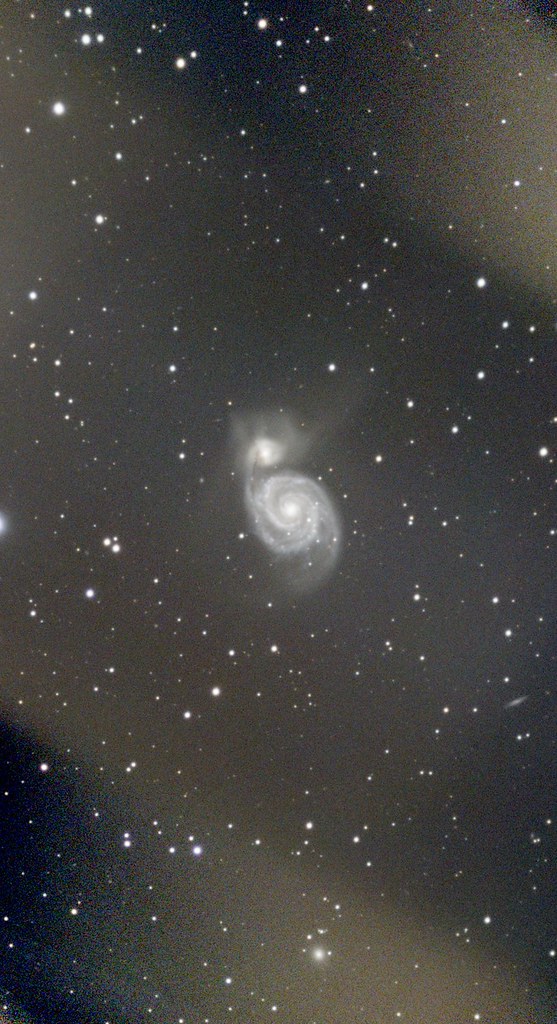
    The Whirlpool Galaxy, a face-on spiral galaxy with its small companion at the top of one arm, in a field of stars
    The Whirlpool Galaxy (M 51): 4,628 ten-second frames, 12 hours 52 minutes in total, stacked in Siril.

    M 51, the Whirlpool Galaxy, was the first: 4,628 frames, 12 hours 52 minutes of integration, colour-calibrated against 115 stars. I published it on vividgrey on 9 November.

    The Pacman Nebula, a reddish cloud of glowing gas with a dark lane cutting into it, surrounded by dense stars
    The Pacman Nebula (NGC 281): 2,002 frames from five nights, 5 hours 34 minutes in total.

    NGC 281, the Pacman Nebula, came from the first Tuesday run on 10 November: 2,002 of 2,564 frames from five nights between October and December 2025, 5 hours 34 minutes in total, calibrated against 1,239 stars. It was published on 12 November.

    When AstroProcessor was first set up it found 16 candidates waiting, so there is plenty in the queue.

    What I’ve learned

    • Prove it before you build it. A proof of concept on a single target answered the only question that mattered, and made all the design decisions easier.
    • Split the work where it belongs. The PC does the heavy processing; the Pi, which is always on, does the publishing and the reminding. They only talk through a folder on the NAS.
    • Not everything needs an AI at run time. Claude Code built both halves, but once the decisions were made, plain scripts were the right tool. The AI’s judgement was spent once, up front.
    • Make crashes safe, not just rare. The first-run bug was harmless because the job records each step and resumes where it stopped, and because the fix made the risky step safe to repeat.
    • Keep a human on the Publish button. I’m happy for the pipeline to choose the target and accept the processing automatically, but nothing goes public on either site until I’ve looked at it.

    Quality scoring of individual frames and a proper observing log are still on the ideas list. For now, though, the pile is finally turning into pictures.

    A note on how this post was written: it was drafted by Claude Code from the AstroProcessor and AstroPublisher repos, their code history and my vault notes on the pipeline, and written into WordPress as a draft through the API. Claude chose the photos from my Flickr account. I reviewed and edited it before publishing.

  • 65 Targets and 77 Hours: Cataloguing My Seestar S50 Night Sky

    I’ve never written about astronomy here, which is odd, because for the last year and a half one of my favourite gadgets has been a smart telescope. Since March 2025 I’ve been pointing a ZWO Seestar S50 at whatever is up and letting it do its thing, and every file it has produced has been piling up on my NAS ever since.

    This week I finally asked Claude Code to make sense of that pile. The result is a note in my Obsidian vault for every target I’ve captured, and some numbers that surprised me.

    What the Seestar is

    The Seestar S50 is an all-in-one telescope: a 50 mm triplet apochromatic lens with a 250 mm focal length (f/5), a small 2 MP Sony sensor, a motorised mount and a computer, all in one box. You choose a target in the phone app, it finds it, tracks it and takes 10-second exposures, stacking them live as it goes. There is no eyepiece. What you get is a growing image on your phone, and a folder full of files.

    It saves each individual frame as a .fit file (the FITS format astronomers use, with all the capture details in a header) along with JPEG previews and its own stacked results. That’s where the problem starts.

    The pile

    Before this week I couldn’t have told you how much I’d captured. Claude Code on my Windows PC looked at the share on the Synology NAS and came back with:

    • 24,857 .fit files, taking up 98.2 GB
    • 49,802 JPEGs, another 20 GB
    • 44 videos and a handful of other files, for about 119 GB in total
    • 118 folders, all at one level, because the Seestar makes separate folders for each target’s stacks, sub-frames, mosaics, photos and videos (M 31, M 31_sub, M 31_mosaic and so on)

    Once you fold those variants together, that’s about 65 distinct targets. Nobody is going to look through that by hand, least of all me.

    One note per target

    The vault already has a note per camera, so the Seestar got one, and then a new Astronomy folder with a note for each of the 65 targets. Claude read the file names and FITS headers and filled in each note with:

    • What it is. A short description, its catalogue numbers and common name, and a type: galaxy, emission nebula, planetary nebula, cluster, comet, planet or star.
    • Capture stats. Number of sub-frames, exposure, filter, gain, total integration time, number of nights, first and last dates, the biggest stack and how much space it takes on the NAS.
    • A session table. One row per night, with the frames and integration for that night. Nights run noon to noon, so frames taken after midnight count towards the evening they started.
    • Space for me. Empty fields for a rating, the processed image, where it ends up published, and my own notes.

    Because the stats are in each note’s properties, an Obsidian Base turns the whole folder into a sortable table, which is where the fun numbers come from.

    What it adds up to

    • 65 targets: 20 galaxies, 16 emission nebulae, five planetary nebulae, five planets, seven stars, a few clusters, two comets, the Moon and the Sun (through a solar filter).
    • About 24,600 sub-frames, almost all of them 10-second exposures.
    • About 77 hours of integration across 82 nights, from the first session in March 2025.
    • Nearly half the targets were a one-night stand. 31 of the 65 were only ever captured on a single night.

    The clear favourite is the Whirlpool Galaxy, M 51: 17.4 hours over 21 nights, with the biggest single stack at 1,362 frames (nearly four hours). That one target is almost a quarter of everything I’ve captured. After that it drops off quickly:

    • the Pacman Nebula (NGC 281), about 7.1 hours
    • the Horsehead Nebula region (IC 434), about 6.2 hours
    • Bode’s Galaxy (M 81), about 3.7 hours
    • the Andromeda Galaxy (M 31), about 3.4 hours

    The session dates tell their own story too. April 2025, the first full month, had 16 nights; June and July together have just one. In Scotland it barely gets dark in midsummer, and the catalogue shows it.

    The Andromeda Galaxy as a bright oval core with faint spiral arms, surrounded by stars, taken with a Seestar S50
    The Andromeda Galaxy (M 31): a 13-minute stack straight off the Seestar, from earlier this week.

    What the catalogue doesn’t do yet

    This was a one-off run, so it’s already slightly out of date. The newest session in it is from August, and I’ve been out again this autumn: a comet, 161P/Hartley-IRAS, in October, and Andromeda again this week. Those stacks are on Flickr, but they aren’t in the notes yet.

    It also only counts. It says nothing about whether the frames are any good, and some of them certainly won’t be.

    What comes next

    I’ve written the next steps up as a project in my vault. They are ideas at this stage rather than anything built:

    • Quality scoring. Score every sub-frame for sharpness, background and satellite trails so the bad ones can be thrown out before stacking, and keep the per-target stats up to date as new sessions arrive.
    • Proper stacking on the PC. Siril can be scripted, and can stack many nights of one target together. It would run on the Raspberry Pi, but the Pi is already busy running everything else, so the Windows PC, with a proper graphics card, is the better place for the heavy work.
    • Publishing. Finished images are to go on vividgrey.co.uk. The idea is the same pattern as this blog: Claude creates a draft post per target through the WordPress API, and I review and publish it myself.
    • The extras. A gallery, a Messier and Caldwell observing log, and something that notices new uploads and updates the notes.

    The 17 hours of the Whirlpool Galaxy are the obvious first test. If 21 nights of data stack into something better than the best single night, the rest of the pipeline is worth building.

    If you’ve been following my posts about what I’ve built with Claude Code, this is a slightly different use of it. There’s no service here and nothing running on a timer, just a big pile of data turned into something I can actually browse. Seventy-seven hours under the stars, and I didn’t know until this week.

    This post was drafted by Claude Code from my vault notes on the Seestar and the 65 Astronomy target notes, and written into WordPress as a draft through the API. Claude chose the photo from my Flickr account. I reviewed and edited it before publishing.

  • On This Day: Twenty-Six Years of Photos Back in My Notes

    I’ve been taking photos and putting them on Flickr for a very long time, and like most people I almost never look back at them. Thousands of pictures from holidays, days out and events, all sitting in albums that I last opened the day I uploaded them.

    Meanwhile my Obsidian vault has a note for every trip and a lot of the events I’ve been to, and a Daily note that I open every morning. The two never met. So last weekend I asked Claude Code to connect them, and the result is a small project called FlickrVault. It does two things: it puts an “On This Day” section with old photos into every Daily note, and it links my Flickr albums to the matching Trips and Events notes. (For the wider picture of what runs on my Raspberry Pi, see What I Have Built With Claude Code (So Far).)

    On This Day

    Every night, shortly after the n8n workflow that creates my Daily note has run, a script adds a section headed “On This Day”. For each earlier year in which I took photos on today’s date, it shows:

    • The year and how long ago it was, linked to that day’s photos on Flickr.
    • How many photos I took that day.
    • Up to three thumbnails, spread through the day rather than the first three, so a day that started at breakfast and ended at a show gets a picture from each part. Each thumbnail links to the photo on Flickr.
    • Any Trip or Event note that covers that day, so I can jump straight from “26 years ago” to my notes about where I was.

    It does one Flickr search per year, starting from 1995, which comes to about 30 calls and takes around 45 seconds. Yesterday’s section went all the way back to 2000, 26 years ago. Private photos appear too, which is fine because the vault is private: the thumbnails load without signing in, and the links to Flickr need me to be signed in.

    A few details make it reliable rather than just working on a good day:

    • It never creates the Daily note itself. If n8n hasn’t made it yet, the script logs that it’s waiting and a second run at 06:15 tries again.
    • Re-runs are harmless. If the section is already there, nothing happens. The note is re-read just before writing and replaced in one go, so it can’t trample on something I’ve typed in the meantime.
    • It doesn’t use AI. This is plain Python with no model in the loop. Picking photos by date doesn’t need judgement, so there’s nothing to go wrong and nothing to pay for.

    Flickr’s API isn’t always cooperative. The run log has a fair number of “the Flickr API service is not currently available” errors, but the scheduled runs have filled in every Daily note since it went live on 24 October.

    Linking albums to trips

    The second job runs every Sunday morning and works out which Flickr albums belong to which Trips and Events notes. Each of those notes already has start and end dates, so the rule is simple: an album matches a note when at least 80% of its photos were taken within the note’s dates. What happens next depends on the album’s name:

    • The name fits as well. If the album name shares a word with the note’s name or location, the album’s link goes straight into a flickr_album: list in the note’s properties. The word match is fuzzy, so a misspelt album name like “Maderia” still matches “Madeira”.
    • Only the dates fit. A birthday album taken during a trip, for example, matches on dates but probably isn’t part of the trip. These go into a review note as tasks instead.
    • The name and year fit, but only some of the photos do. If 30–80% of the photos are inside the dates, that also goes to review.

    In the review note I tick a task to link the album, or mark it as cancelled to reject it, and the next Sunday run applies my choice. Rejected pairs are never suggested again, and links that are already in a note are never removed or reordered.

    The first run took a while, because it had to fetch the photo dates for every album (around 800 Flickr calls). Those dates are cached, and only albums that are new or have changed are fetched again, so the weekly run is quick.

    Panorama of a harbour with a row of brightly painted buildings along the waterfront and boats moored in the bay
    Tobermory, from my 2020 trip to Mull. Both of that trip’s albums are now linked from its note.

    What the dry run caught

    Before letting it change any notes, Claude ran the matching as a dry run first. Three problems showed up, all down to the way I’ve named albums over the years:

    • Squashed-together names. Albums named like MNDBall-2015 or Holiday2024-Orkney weren’t being split into words, so they never matched anything by name. The matcher now splits on changes of case and on digits, so those become “mnd ball” and “orkney”. Words like “holiday” and “trip” are ignored, because they’d match everything.
    • parkrun the day before. I have plenty of parkrun albums. Because a match on dates alone allowed a day either side, a Saturday parkrun album was being suggested for a one-day event on the Sunday. Now a match on dates alone has to be strictly inside the note’s dates; the extra day either side is kept only when the name fits too, to allow for photos from the journey and cameras with the wrong clock.
    • Catch-all albums. Favourites, auto-upload and year-only albums were turning up as suggestions. They’re never about one trip or event, so they’re now ignored completely.

    After those fixes, the first real run linked 50 albums to 40 notes (34 trips and 6 events) and put 39 less certain matches in the review note. Some of those are clearly right (an album of a space centre visit during a Florida holiday has a name that shares no words with the trip). I’ll admit that I haven’t worked through them yet: all 39 are still waiting for me.

    Two weathered, abandoned wooden fishing boats lying on a stony shore beside a calm loch, with hills behind
    Old boats at Salen, Mull, 2020.

    Keeping track of which photos are used

    Once photos started appearing in my notes (and, as it happens, in posts on this blog), I wanted to be able to see on Flickr which ones were being used. So every photo that something on the Pi uses gets two tags, claudelinked and one saying what it was used for, and is added to a matching “Linked” album. The On This Day job marks the thumbnails it shows, and the Sunday job finishes by scanning the whole vault for links to my photos, albums and days and marking all of them.

    That scan taught a small lesson about what counts as a failure. On its first big run a handful of Flickr calls failed with gateway timeouts, the run retried them and sent them all, and the run still logged itself as failed, which set off my regression tests. It now counts as failed only if photos are still waiting to be sent when it finishes.

    How it fits with everything else

    • One shared Flickr client. FlickrVault doesn’t talk to Flickr directly. It uses the same small client as everything else on the Pi, which can only read. The one exception is marking used photos, which goes through a separate tool.
    • EventCapture adds photos as it goes. My weekly EventCapture run, which records the shows, meals and days out it finds in my email and calendar, now also checks Flickr for photos from each event and adds an album, or the day’s photos once it has looked at a few to check they’re from the event. The Sunday album job catches anything I upload later.
    • The usual rules. Its own git repo and README, a changelog note in the vault, and a regression test that checks the timers are running, today’s section is there, and the last album run didn’t fail.
    A white lighthouse on a low island under heavy grey clouds tinged with pink at dusk
    A lighthouse at dusk on the last evening of the Mull trip.

    Was it worth it?

    It’s only been running for a week, but yes. Three small photos from a day 16 or 18 years ago, at the top of the note I open every morning, are a far better way back into my photos than albums I never open. The trip links matter more in the long run: my notes about a holiday and the photos from it are finally one click apart.

    Now I just need to work through those 39 suggestions.

    A note on how this post was written: it was drafted by Claude Code from the FlickrVault repo, its code history and my vault notes, and Claude chose the photos from my Flickr account. It wrote the draft directly into WordPress through the WordPress API, and I then reviewed and edited it before publishing.

  • Flickr Photographer – Matthew Nuttall

    I just recently discovered this photographer via a forum at work. He has some stunning nature photos and my personal favourite – black and white urban landscapes.


    (more…)

  • Flickr Photographer – Thomas Hawk

    Another of my favourite photographers from Flickr – Thomas Hawk. He has a very eclectic style and rarely disappoints.


    (more…)

  • P4300010

    Love how dark and moody this turned out – was actually a nice bright day.

    via Flickr http://flic.kr/p/UGwsNP

  • P4300016

    via Flickr http://flic.kr/p/UruRNC

  • New photo set on Flickr – parkrun-StrathclydePark-20160402


    New photo set parkrun-StrathclydePark-20160402 –
    from Flickr http://ift.tt/1VjAOBs
    via IFTTT

  • New photo set on Flickr – parkrun-StrathclydePark-20160326


    New photo set parkrun-StrathclydePark-20160326 –
    from Flickr http://ift.tt/1RnhQJ0
    via IFTTT

  • New photo set on Flickr – MND Scotland Cornflower Ball 2016


    New photo set MND Scotland Cornflower Ball 2016 –
    from Flickr http://ift.tt/1Xo3rfD
    via IFTTT