Category: Technology

  • Security – TrueCrypt – Encrypt Your Files

    I was recently asked by a customer what steps we take to secure their files. I always use TrueCrypt to encrypt all customer files. This is an overview of how you can use TrueCrypt.

    TrueCrypt gives you the ability to store information in a hidden partition that is secure from prying eyes.
    Just as importantly the software is easy to use, being almost seamless in use.
    (more…)

  • The luddite is leaving the building !

    Despite my working in IT and also “enjoying” technology, our kids being typical kids and having a PC each and an unstoppable curiosity, Elaine has never shared our passion.

    Last week Elaine tore the ligaments in her left foot so has not been able to hit the shops at all and has been forced to stay at home with her feet  up. Over the space of that week she did her first Asda shop online.

    Last night, with no prompting Elaine had the laptop out and was shopping unaided !

    The coup de grace was the next question:

    How to I get the BBC iPlayer on the Wii to work again !

  • Twitter Local – Depressing

    Twitter Local

    As you know I love Twitter. OK there are some things i find annoying, the lack of groups is one.

    The main thing is the lack of uptake amoungst my “real” friends and colleagues. OK, this is in part due to the short sightedness of most customer sites using WebSense or proxy rules to block it. I have just been further depressed by Twitter Local a great site that shows you the geographocal location of tweets. I have seen similar sites on the macro scale, for example: TwitterVision gives you a world map with tweets appearing all over it.

    Twitter Local works at the other end of the scale, you give it a location and a radius and it shows you “local” tweets. So, why am I depressed: I can only find two other twitterers within 5 miles of me!

    tweet tweet
  • Real Time Stalking

    LinkedIn

    Fact

    I rarely “surf” to random sites any more, any site that wants my attention must have an RSS feed that I can put into Google Reader.

    Fact

    I am intrigued by the social networking sites, a few are listed here. LinkedIn is one that I can see the point of.

    LinkedIn have recently introduced an RSS feed for my network updates, so it ticks both boxes. What’s the downside? I’m not sure what it is. It could be that LinkedIn is a work/professional focussed network rather than personal. It could be the immediacy of the updates from my colleagues. It’s strange but I feel crossed between a stalker and a voyeur in a way that I just don’t get from feeds from other sites.

    View Ross Goodman's profile on LinkedIn

  • Google Documents – Gadgets

    I have found myself using Google Documents more and more over the last few months.

    One of the areas that was severely lacking was the ability to share parts of that content.

    That is all changed now with Google Gadgets.

    For example, for my training I had resorted to n HTML table on my training page https://rossgoodman.com/fundraising/training/ whilst not difficult it is not exactly elegant.

    Now I am recording my times in a Google spreadsheet and using two gadgets, one to show a tabular list if the data and another to show an interactive time series chart, the same as is used on google finance.

    Cool Huh !

  • Ideal Working Environment

    My Home Office

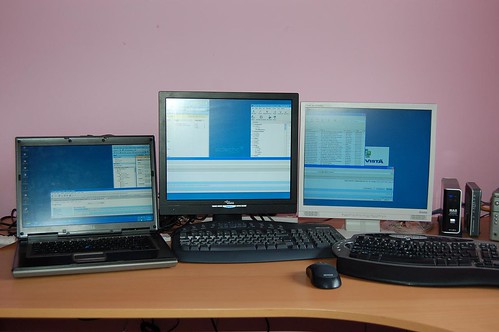
    I have just fine tuned my working environment and have come up with the ideal setup.

    OK the monitor heights are a bit wonky but I very rarely span monitors, I like to have discrete items open in each and focus on one monitor at a time.

    In this picture I have outlook split between monitors 1 & 2, thunderbird between 2 and 3 and firefox crossing all 3.

    (more…)

  • Scary Mary !

    Scary Mary !

    I treated myself to an external flash for my camera, specifically a Nikon SB-800.

    This allows me to play around with having the flash off camera. Mucking around produced the photo above, which also gives a sneak preview to the “face fungus” which I am currently cultivating.

    As you may or may not know, i love the concept of openid which allows you to have a single authorisation location for multiple sites (including this blog). It also allows you to have a single profile page. It has just scared me the number of places where my profile photo may be, I’m going to spend the next hour seeing how many places I have put it!

    OK, in 1 hour I have found 16 discrete sites, and I have not even started with the forums that I frequent !

  • Flickr Favourite Surfing

    Flickr

    One of the core principles in Flickr is having the ability to mark any photo that you see as being a favourite.

    This page http://bighugelabs.com/flickr/surf.php from Big Huge Labs lets you explore this concept further. Choose a contact, one of your own or just a random person and it will display some of their favourite photos.

    Click on one to see it large. It then joms to the owner of the large photo and shows you their favourites and so on, and so on and so on……..

    This is such a simple concept and so addictive.

    You have been warned !

  • My First TwitterBot

    Twitter

    I have just “finished?” my first twitterbot!

    If you send it a direct message with part of the name of someone who works at Eclectic it will send you their contact details as a return direct message.

    The API is very straight forward, only my lack of bash skills slowed me down.

    (more…)

  • OpenID

    I first heard of OpenID ages ago.
    You can read more about it here
    I have now added a plugin that makes this site OpenID aware.
    If you have an openID then feel free to use that to sign up, otherwise you can continue to use standard user names and passwords.
    The list of other sites that use OpenID is growing here, long may it continue to grow !